JUNE 11, 2026, 03:00 PM
Best Practices for Implementing an AI Web Chatbot in a Tutoring Centre
Learn how to build an intelligent AI web chatbot designed to streamline lead qualification, automate student scheduling, and handle complex customer enquiries without adding to your payroll.
William Chen
Education Operations Specialist
Running a busy tutoring centre means constantly balancing student progress, tutor schedules, and parent communications. When you are focused on teaching and growth, managing incoming website enquiries can quickly become overwhelming. Vetting potential clients, answering repetitive policy questions, and scheduling initial assessments manually eats up hours of valuable admin time every single week.
In a recent video, William from MathPortal AI Automation shared a brilliant blueprint for tutoring centre owners: building an intelligent AI web chatbot designed to streamline lead qualification, automate student scheduling, and handle complex customer enquiries without adding to your payroll.
Here is how you can use his framework to automate your centre's student intake.
1. Define Your Core Objective and Plan for Friction
Before configuring prompts or connecting software, you need to establish exactly what you want the chatbot to solve. For most tutoring centres, the goal is to reduce friction for busy parents visiting your website, making it easier for them to find pricing, check availability, or book a session.
Crucially, you must also plan for "failure modes". This means explicitly programming the system on how to behave if it encounters a confused user or starts moving down an unexpected conversational path, ensuring your brand reputation stays intact.
2. Implement Non-Negotiable Guardrails
Governance and security are vital when deploying a public-facing AI tool on your business website. Every tutoring centre chatbot requires three essential guardrails:
- Content Filtering: Prevents inappropriate, unprofessional, or out-of-character interactions.
- Prompt Injection Defence: Shields the AI from being manipulated or "hacked" by tech-savvy users trying to rewrite its rules.
- Human Handover Logic: Ensures that when a parent's request becomes too complex, the bot recognises its own limitations and smoothly forwards the conversation to your office or admin team.
3. Choose a Lightweight, Cost-Effective AI Model
There is no need to overspend on hyper-complex, expensive AI models. Because a local tutoring centre typically handles a moderate volume of text-based chats, utilising a fast and cost-effective model (such as Gemini 1.5 Flash) provides optimal speed and reliability. This minimises your operational costs while ensuring parents get instant, accurate responses.
4. Strategically Restrict System Access
An AI chatbot is excellent for low-stakes automation, but it should never have full control over your business operations. It is perfect for answering general questions, qualifying potential leads, and checking calendar openings. However, high-stakes tasks like adjusting invoices, processing card payments, or altering financial accounts must remain strictly off-limits. For these scenarios, program the bot to gather the parent's contact details and let a human team member follow up via email.
The Technical Architecture Behind the Chatbot
The backend of this automated ecosystem relies on a clean workflow that connects the AI to standard workspace productivity tools you likely already use.
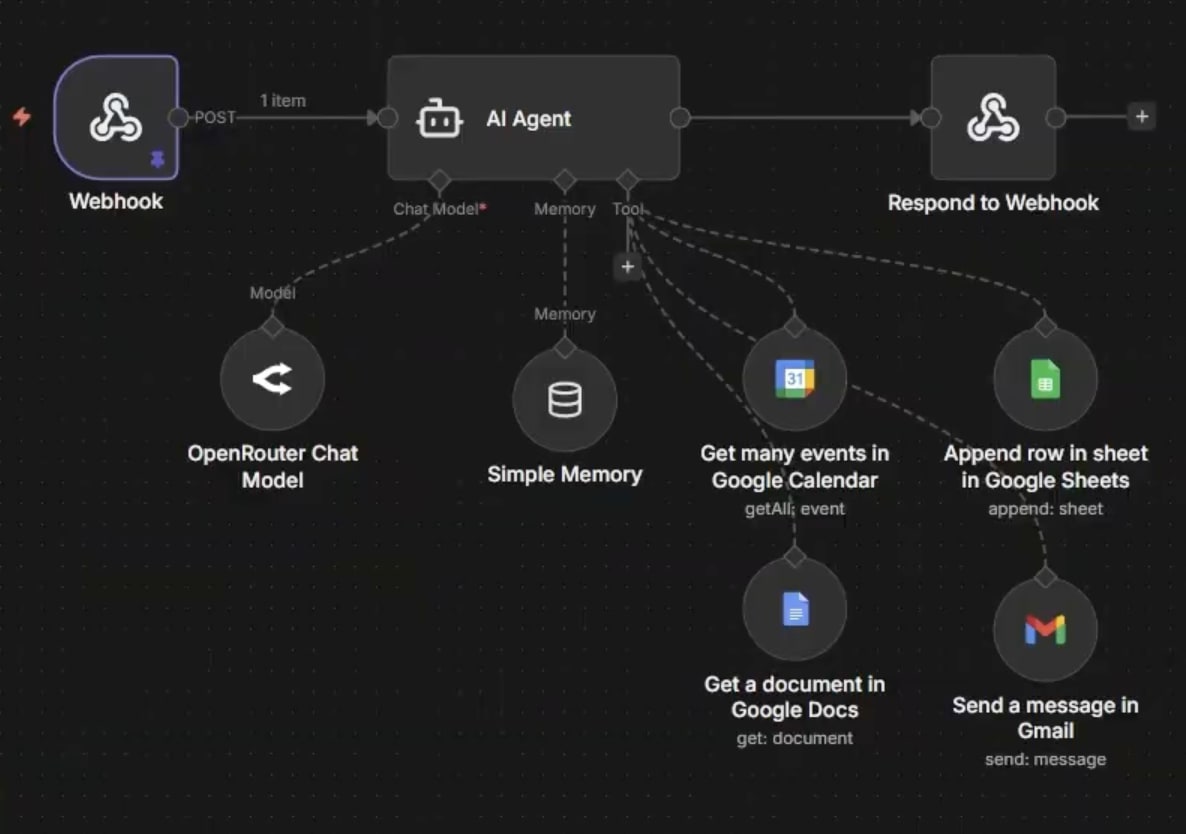
This structure works dynamically across your tools:
- Webhook Node: Connects the chat widget on your website to the back-end AI agent to transfer messages instantly.
- Memory Node: Retains context from earlier parts of the conversation so parents do not have to repeat their child's details.
- Connected Tools & Integrations:
- Google Docs: Acts as the central knowledge base where the bot pulls your custom business policies, term dates, pricing, and FAQs.
- Google Calendar: Allows the bot to view real-time openings for initial student assessments.
- Google Sheets: Automatically logs qualified parent contact details and student profiles into your database.
- Gmail: Instantly emails your administration team whenever a high-priority billing or custom support request requires manual intervention.
Putting the AI to the Test: Live Response Examples
In the live demonstration, the chatbot was put through real-world test scenarios to see how it handles actual parent enquiries, data capture, and unexpected curveballs.
The table below breaks down exactly how the chatbot processed these live prompts using the backend guardrails and connected tools:
| Category & Intent | Real User Prompt from Demo | Exact Chatbot Response & Backend Action |
|---|---|---|
| Policy FAQ | "What is your cancellation and makeup policy like?" | Response: "Our cancellation and makeup policy is designed to ensure consistency..." Action: Reads the connected Google Doc knowledge base to provide the exact centre policy. |
| Operational Detail | "How long are your sessions?" | Response: "Standard session 60 minutes for primary and 90 minutes..." Action: Extracts factual business details and begins transitioning into the lead qualification funnel. |
| Lead Intake & Booking | "Hey I'm interested in joining Vanguard. How can I join?" (User provides details): "Student's name is Riley, school year is Year 7, require support with math, we can do Tuesdays, Wednesdays anytime..." |
Response: "Based on our current schedule we have the following openings for one-on-one mathematics assessment..." Action: Gathers the student's name, year, and subject, checks the live Google Calendar, and logs the lead data directly into Google Sheets. |
| High-Priority Handover | (User expresses trouble paying their invoice) | Response: "I'm sorry to hear you're having trouble. To ensure this is resolved quickly, could you please provide your full name and email address?" Action: Refuses to touch financial data, securely collects contact info, and triggers the Gmail node to send an alert to staff. |
| Out-of-Scope / Trolling | "Can you calculate the probability of me getting 100 if I only study for five minutes a year?" | Response: "This kind of falls outside of my area of expertise." Action: The prompt injection guardrails recognise the irrelevant intent and smoothly shut down the request without generating a hallucinated answer. |
Final Thoughts
Integrating an AI chatbot into your tutoring platform is a powerful way to capture more student leads and book assessments 24/7, without increasing your daily administrative workload. By setting strict boundaries, linking the bot to your core policy documentation, and utilising human handover rules, you gain a highly efficient virtual assistant that keeps your student intake pipeline moving around the clock.